
Commissionwith Confidence.
CxMaestro shows commissioning teams exactly what's ready, what's blocked, and what to work on next. Replace spreadsheets with a deterministic commissioning platform built for hyperscale data centers.

Built for DACH data center & mission-critical commissioning teams
The problem today
Commissioning shouldn't run on spreadsheets and hope.
Excel ITR templates getting lost
Every ITR lives in one auditable system of record — versioned, searchable, never emailed as an attachment again.
No real-time deficiency tracking
Severity, aging, and assignment update live across the team the moment a deficiency is logged in the field.
Handover packages take days
Generate a signed, merged turnover PDF — certificates, ITRs, deficiency register — in minutes, not days.
System of Intelligence
One failed test. See everything it blocks — instantly.
A document system tells you a generator test failed. CxMaestro's dependency graph tells you which ATS, UPS, PDU, and rack rows just went at risk — automatically, not after someone cross-checks four separate document trails by hand.
See it in action
This is what your team actually works in.
Real screenshots, real data model — not marketing mockups.
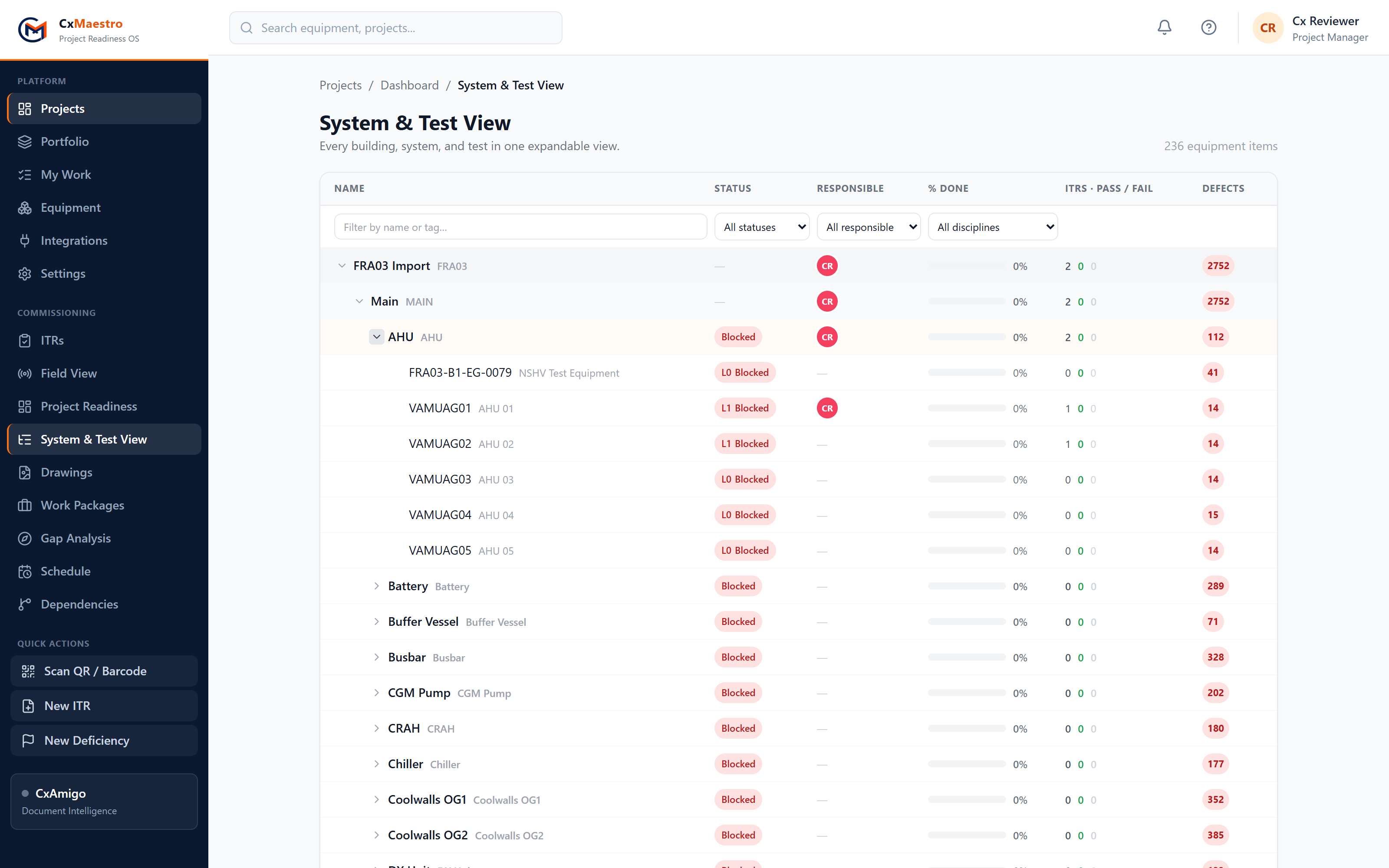
System & Test View
Every system, every test, one tree
- ✓Expand from building down to a single equipment tag — with live L0–L5 status, % done, and pass/fail counts on every row.
- ✓See who's responsible at a glance, and filter any column: status, discipline, engineer, or free-text tag search.
- ✓The same numbers as the readiness dashboard — one source of truth, never two disagreeing reports.
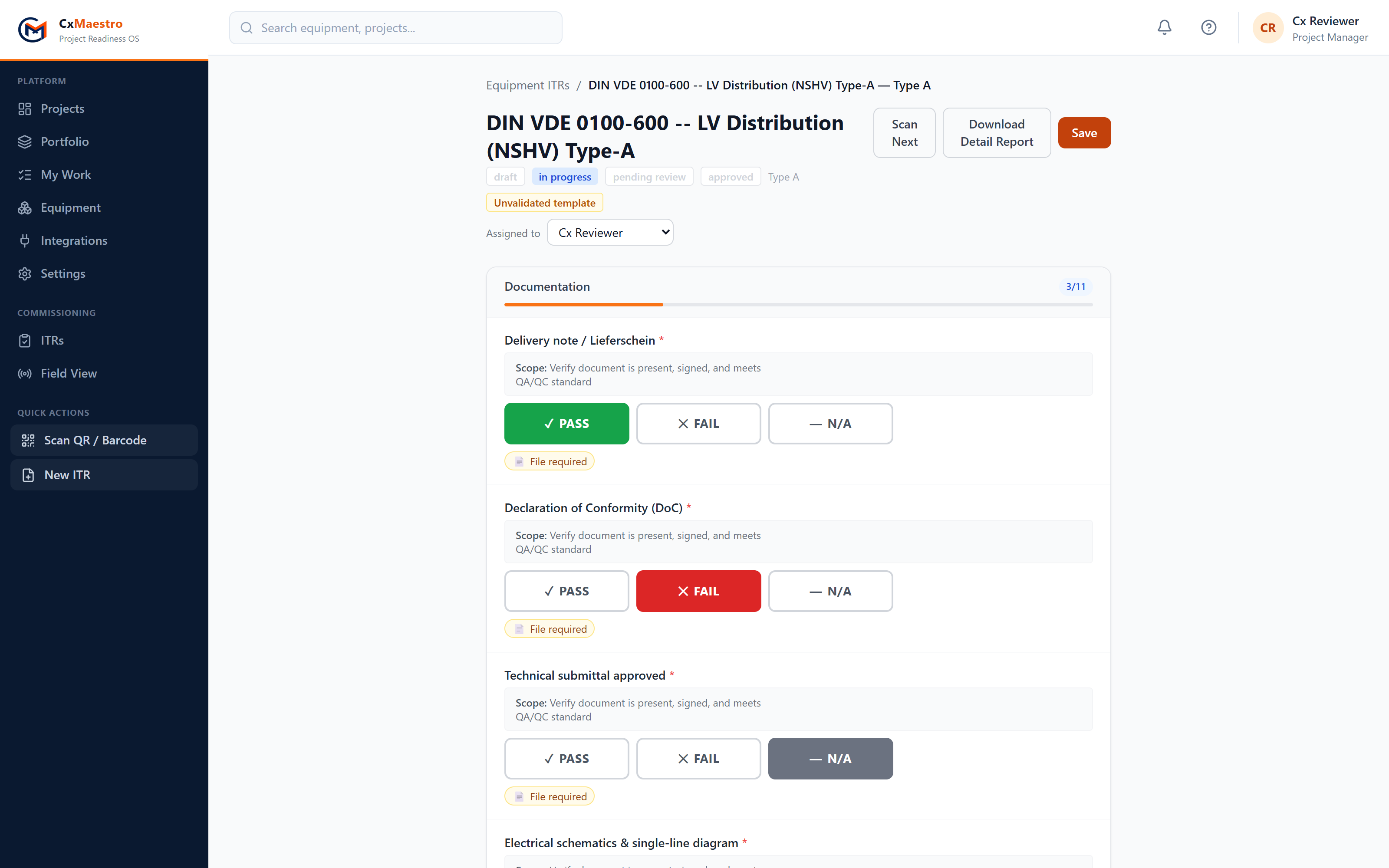
Testing of Equipment
Field testing that works with gloves on
- ✓Big PASS / FAIL / N/A buttons sized for a tablet in one hand and a torque wrench in the other.
- ✓Section-by-section progress counters, required photo and file evidence flagged inline, offline-first saving.
- ✓DIN VDE 0100-600 and EN 50600 checklists built in — acceptance criteria and test method on every line item.
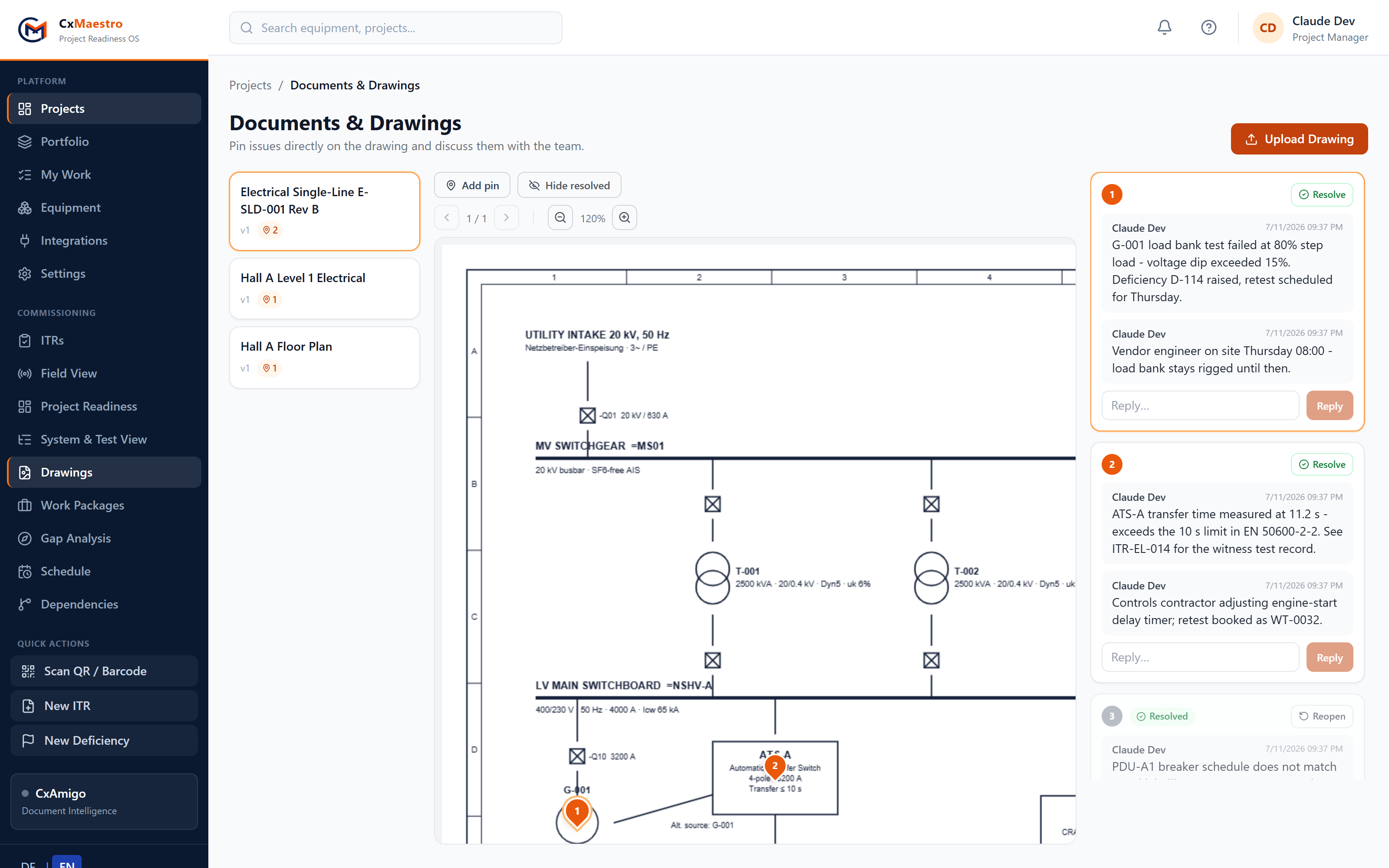
Documents & Drawings
Pin it on the drawing, not in an email
- ✓Upload floor plans, P&IDs, or schematics — PDF or image — and drop numbered pins exactly where the issue is.
- ✓Every pin has its own comment thread: discuss, reply, and resolve without leaving the drawing.
- ✓Pins keep their place at any zoom level, and resolved items stay auditable instead of vanishing.
Why switch
Goodbye spreadsheets. Hello CxMaestro.
| Excel & email | CxMaestro | |
|---|---|---|
| ITR templates | Copied workbooks, versions drift per engineer | ✓30 DACH templates built-in, versioned centrally |
| Live test status | Someone consolidates tabs every Friday | ✓L0–L5 readiness updates the moment a test is saved |
| Deficiencies | A punch list tab nobody trusts | ✓Severity, aging, photos, contractor assignment — tracked live |
| Handover package | Days of collating PDFs and signatures | ✓One click: signed, merged turnover package |
| Offline on site | Works — until two people edit the same file | ✓Offline-first field app with conflict-safe sync |
| Audit trail | Whoever last saved the file wins | ✓Every field change timestamped and attributable |
Core features
Everything a commissioning team needs, in one system.
L0–L5 Progression Engine
Deterministic readiness levels that block sign-off until every prerequisite is actually complete.
Digital ITR Management
A/B/C checklists with conditional logic, sign-off columns, and a full field-level audit trail.
Deficiency Tracking with Photos
Severity, aging, contractor assignment, and photo evidence attached directly to the punch item.
Witness Test Scheduling
TN generation, multi-party invites, and digital sign-off — with automatic re-test workflows.
PDF Turnover Package
Deficiency register, ITR completion matrix, commissioning certificate, and test log merged into one deliverable.
Excel ITR Import
Bring your existing Excel ITR templates in directly — no manual re-keying.
Drawings & Pin Annotations
Upload floor plans and P&IDs, drop numbered pins, and resolve each one in a threaded team discussion.
How it works
From equipment list to signed handover.
Upload Equipment List
Import your equipment registry from Excel, or pull it automatically via the CxAmigo document intelligence bridge.
Run ITRs on Site
Field engineers complete A/B/C checklists offline on mobile, with photo evidence and QR-code equipment lookup.
Generate Turnover Package
One click produces a signed, merged PDF handover package ready for the client and the commissioning authority.
Pricing
Simple plans that grow with your firm.
Pilot
For one real project, end to end.
- ✓1 active project
- ✓Full ITR & deficiency workflow
- ✓Witness test scheduling
- ✓PDF turnover package
- ✓Email support
Professional
Per commissioning firm, per month.
- ✓Unlimited projects
- ✓Offline field PWA
- ✓Dependency graph & risk engine
- ✓CxAmigo document intelligence
- ✓Priority support
Enterprise
Multi-firm, multi-region deployments.
- ✓Multi-firm & client portal
- ✓Row-level tenant isolation
- ✓On-prem / private cloud
- ✓DACH compliance templates
- ✓Dedicated onboarding
Need multi-firm or on-premise deployment? Contact us for pricing.
FAQ
Common questions
Does CxMaestro work offline?+
Yes. The field PWA queues ITR entries, deficiencies, and photos locally and syncs automatically with conflict detection once you're back online.
Can I import my existing Excel templates?+
Yes. CxMaestro reads standard Excel ITR templates directly and can export back to the same format.
Is my project data secure?+
Data is tenant-isolated per firm, encrypted in transit, and can be deployed on-premise or in a private cloud for clients with strict data residency requirements.
What regions does it support?+
CxMaestro is built with the DACH region (Germany, Austria, Switzerland) as a first-class target — including EN 50600, DIN VDE, GEFMA 100, and ISO 41001 templates and a bilingual German/English UI — and works internationally as well.
Do I need an AI key to use CxMaestro?+
No. The core commissioning workflow (ITRs, deficiencies, witness tests, turnover packages) works without any AI configuration. An OpenRouter key only unlocks optional AI-assisted document parsing.
How long does it take to get a pilot project running?+
Most firms are running their first ITRs within a day of importing their equipment list and ITR templates.
Can my team mark up drawings and discuss issues on them?+
Yes. Upload floor plans, P&IDs, or schematics (PDF or image), drop numbered pins directly on the drawing, and discuss each pin in a threaded comment sidebar with resolve/reopen — so site issues live on the drawing, not in an email chain.

Ready to modernise your commissioning?
Join teams delivering better projects with less risk and more confidence.